


Last month, I finally decided to start building my own website. After six years optimizing campaigns for B2B SaaS companies like Productsup and Localyze, I realized it was time to create what I’d been missing: my marketing portfolio.
Building my marketing website seemed like a fun side project for my free time. I chose the WordPress Personal Plan at €4/month with a custom domain stefanomandola.com. Simple, affordable, professional-looking. What could go wrong?
Turns out, quite a lot when it comes to WordPress SEO on Personal Plan.
Table of contents
- How do you incorporate SEO into your WordPress site?
- The challenge: WordPress Personal Plan vs SEO requirements
- WordPress plans: SEO comparison for digital marketers
- What WordPress Personal Plan actually limits for SEO
- Can you do SEO on a WordPress Personal Plan?
- What it means for your WordPress SEO strategy
- What I’m going to do next to scale my WordPress SEO
- The bottom line on WordPress SEO with Personal Plan
- Moving forward with WordPress SEO
- Frequently asked questions about WordPress SEO
How do you incorporate SEO into your WordPress site?
TL;DR: If you’re on WordPress Business Plan or above, you can easily use SEO plugins like Yoast SEO, RankMath, or All in One SEO to manage everything automatically. These plugins handle meta descriptions, title optimization, schema markup, and technical SEO audits.
However, with WordPress Personal Plan, you can’t install plugins unfortunately. But I did extensive research and testing to find out what can be achieved in terms of SEO on a WordPress Personal Plan. I want to save you lots of time and explain exactly what you can optimize for WordPress SEO without plugins.
Here’s what I discovered after building my website and testing every WordPress SEO workaround I could find.
The challenge: WordPress Personal Plan vs SEO requirements
WordPress Personal Plan gives you the basics for website creation. Clean themes, easy content management, reliable hosting. For most people, that’s enough.
But as a marketing manager who’s implemented search engine optimization and conversion tracking professionally, I quickly hit walls. Big ones.
With 43% of websites running on WordPress, it’s easy to see why many face SEO challenges. Working on the Personal Plan, I experienced these limitations firsthand.
WordPress plans: SEO comparison for digital marketers
| SEO feature | Personal plan | Business plan | Impact for search rankings |
|---|---|---|---|
| SEO plugins (Yoast, RankMath) | ❌ No | ✅ Yes | Critical for on-page optimization |
| Custom meta descriptions | ❌ Limited | ✅ Yes | Essential for click-through rates |
| Schema markup | ❌ No | ✅ Yes | Improves search visibility |
| Google Tag Manager | ❌ No | ✅ Yes | Needed for SEO tracking |
| Custom permalinks | ❌ No | ✅ Yes | SEO-friendly URLs |
| Google Analytics 4 | ❌ Limited | ✅ Full Integration | Required for SEO analysis |
| Image optimization control (e.g. disable lazy load for hero images) | ❌ Limited | ✅ Yes | Affects page speed scores |
| Cost | €4/month | €25/month | €21 difference for full SEO control |
What WordPress Personal Plan actually limits for SEO
- No SEO plugins allowed: Can’t install Yoast SEO, RankMath, or other search engine optimization tools that provide keyword optimization, readability analysis, and technical SEO audits.
- No custom meta descriptions per page: WordPress auto-generates these poorly, which hurts your search result click-through rates.
- Schema markup impossible: No structured data means no rich snippets or enhanced search results that help your content stand out.
- No Google Tag Manager integration: I’ve implemented GTM at previous companies for SEO tracking and conversion measurement. Personal Plan blocks the container code completely.
- No custom permalink editing: You get URLs like “/2024/11/21/article-title” instead of clean, keyword-focused “/blog/article-title” permalinks.
- Limited image optimization control: This affects Core Web Vitals and page speed scores that Google uses for ranking.
Can you do SEO on a WordPress Personal Plan?
Yes, but with significant limitations. After months of testing and research, here’s exactly what worked for me:
- Meta titles and descriptions workaround:
- Page titles automatically become your meta titles, plus your website name from Settings > General > Site Title
- The tagline under Settings > General becomes the meta description for EVERY page (not SEO-friendly)
- My solution: Add custom meta descriptions using the “Excerpt” field in your page settings. WordPress uses this for search results instead of the generic tagline.

- Image optimization and Core Web Vitals: I ran a PageSpeed Insights test and discovered every WordPress image uses lazy loading by default, especially if you use the block “Media & Text” as header like I do. Lazy loading delays image loading until users scroll to them, which improves page speed but can hurt your Largest Contentful Paint (LCP) score if applied to hero images on portview.
- My workaround: Access the “Code Editor” on your page and add
loading="eager"to your hero image code. You’ll see a “Block contains unexpected or invalid content” warning, but ignore it – the loading attribute works perfectly and improves your Core Web Vitals scores. However, a key limitation is that this workaround doesn’t apply to featured images on blog posts.
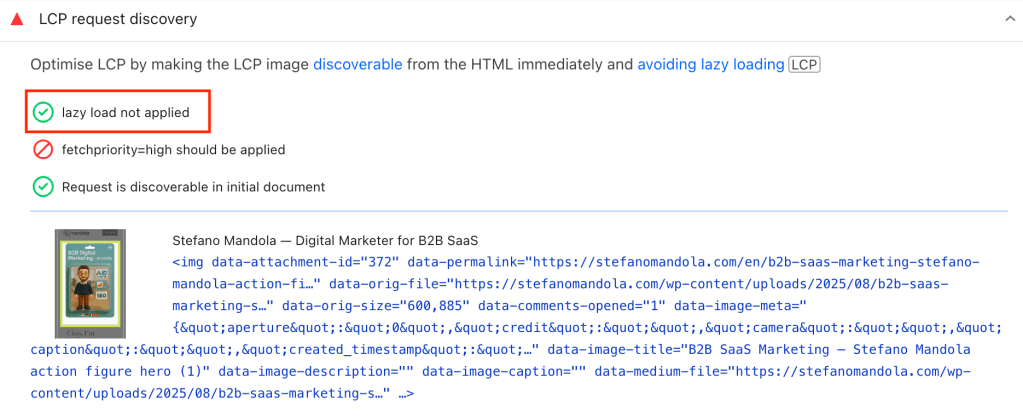
- I also tried adding
fetchpriority="high"but WordPress removes it immediately, so that optimization isn’t possible.
- Alt text and SEO-friendly images: You can easily add alt tags through the image sidebar when uploading. My recommendations:
- Use SEO-friendly WebP format for better compression. You can easily find online tools to convert PNG or JPG files to WebP. My go-to are Squoosh or Photopea
- Resize images to the exact size they appear on the page to make it load faster
- Write descriptive alt text that includes relevant keywords naturally
- Content structure for SEO
- Use heading hierarchy (H1, H2, H3) properly for content structure
- WordPress themes handle this automatically, but check your content follows logical heading order.
- I could also easily edit the blog article page template to build a more SEO-friendly structure, for example by adding author and category links (though not breadcrumbs), previous/next posts, and related articles to improve internal linking and context
- Include target keywords in headings naturally without keyword stuffing
What it means for your WordPress SEO strategy
If you’re a marketing professional building your portfolio or a freelancer considering WordPress, here’s my honest assessment:
Start with Personal Plan if you:
- Want to test your content strategy and SEO approach
- Need to get online quickly with basic optimization
- Have limited budget for website tools initially
- Can implement manual SEO workarounds effectively
You’ll need an external hosting service or the Business Plan for serious SEO when you:
- Want to compete for competitive keywords in your industry
- Plan to implement advanced schema markup and structured data
- Require detailed SEO analytics and performance tracking
- Target multiple languages or international SEO
The reality? WordPress Personal Plan only allows basic SEO implementation. For comprehensive search engine optimization that drives significant organic traffic, you’ll need Business Plan features.
When you’re working with limited budget, deciding where to spend it matters even more. I’ve broken down how to do that strategically in my 2026 guide to B2B marketing budget allocation.
What I’m going to do next to scale my WordPress SEO
I’m staying on Personal Plan while building content and testing these SEO workarounds and monitoring how these manual optimization tactics are working for basic search visibility.
My upgrade trigger: Once I hit 20 blog posts and see consistent organic traffic growth, I’ll move my domain to an external hosting service or switch Business Plan. That’s when I’ll implement:
- Yoast SEO or RankMath for comprehensive optimization
- Advanced schema markup like Website, Person, and FAQPage for rich snippets
- Google Tag Manager, advanced Analytics for SEO tracking and analysis, and a cookie consent banner
- Custom permalink structure for better URL optimization and easier reporting
Based on my experience optimizing websites at several tech companies, proper SEO tools are essential for scaling organic growth beyond basic levels.
The bottom line on WordPress SEO with Personal Plan
After a couple of months testing SEO with WordPress Personal Plan while building stefanomandola.com, I can say that basic search engine optimization is possible but severely limited. Personal Plan works for fundamental SEO implementation, not comprehensive optimization strategies.
For marketing professionals serious about organic traffic growth, WordPress Personal Plan provides insufficient SEO capabilities. You can implement basic optimizations through workarounds, but advanced features require Business Plan access to SEO plugins and technical controls.
The €21 monthly difference becomes justified when you need professional SEO tools for keyword research, on-page audit, and automated optimization features that drive meaningful search traffic growth.
Moving forward with WordPress SEO
WordPress Personal Plan taught me that SEO fundamentals matter more than advanced tools, echoing what I found in my sentiment analysis “AI SEO statistics 2025″. Quality and helpful content that follows Google’s E-E-A-T guidelines, proper heading structure, and basic optimization can drive initial organic traffic. But there’s a ceiling to manual SEO optimization. When you’re ready to compete seriously for search rankings and scale your organic growth, those Business Plan SEO features become non-negotiable.
The good news? You don’t need to tackle everything on day one. Focus on progress, not perfection. Over time, it makes all the difference. So, start with Personal Plan, master the SEO basics through the workarounds I shared, then upgrade when limitations start hindering your search performance. Your future SEO-optimized website will benefit from this strategic, budget-conscious approach.
Got more SEO tips for WordPress or want to share your experience with other CMSs? I’d love to hear from you! Drop a comment or DM me on LinkedIn.
Frequently asked questions about WordPress SEO
Should I upgrade to Business Plan immediately for better WordPress SEO?
Not necessarily. Start with Personal Plan to validate your content approach and implement basic SEO workarounds. Upgrade when manual optimization becomes too time-consuming.
What specific WordPress SEO features am I missing with Personal Plan?
You can’t use SEO plugins, implement schema markup, customize permalinks, or access advanced analytics. These limitations become significant as your content library grows.
Is WordPress Personal Plan sufficient for local SEO?
For basic local search optimization, yes. But local schema markup, Google My Business integration, and advanced local SEO features require Business Plan capabilities.
Can I rank well on Google with WordPress Personal Plan?
Yes, with quality content and manual optimization. However, competing for competitive keywords becomes much harder without professional SEO tools and plugins.



 Stefano Mandola
Leave a comment