

Google Ads can be very effective for B2B SaaS companies. If managed properly, Google Ads campaigns can capture high-intent demand. This applies to both top and bottom-of-funnel KPIs, like SQLs and Monthly Recurring Revenue (MRR).
Every industry and audience is a microcosm of its own. Success on Google Ads requires understanding:
- The unique challenges of your ICP
- Identifying the right decision-makers to target
- How to navigate the complex buyer journeys that differentiate B2B from consumer advertising (B2C).
The difference between profitable Google Ads and budget-burning disasters? Account structure is one part of the equation. The other is precise targeting and avoiding these common 11 Google Ads B2B mistakes.
🔑 Key takeaways
- Incorrect conversion tracking: Treating all conversions equally makes Google optimize for cheap leads. Assign values and import offline conversions to optimize for real revenue.
- Performance Max cannibalization: PMax often steals Search conversions and inflates results. Protect search traffic with brand exclusions and limited budgets.
- Weak audience targeting: Broad targeting shows ads to unqualified users. Define your ICP, use customer lists, and exclude irrelevant audiences.
- Unsupervised AI Max usage: AI-driven targeting burns budget on irrelevant clicks. Control with negatives, exclude bad assets, and start small.
- Starving smart bidding: Without quality conversion data, smart bidding over-optimizes for junk leads. Feed high-value conversions and switch strategies gradually.
- Stale ad copy: Ad copy performance declines over time. Refresh headlines, CTAs, and assets like sitelinks regularly to avoid ad fatigue.
- Broad match misuse: Broad match can trigger irrelevant searches, draining budget. Use exact/phrase match and strong negatives to stay relevant.
- Neglecting placement exclusions: Default placements push ads to kids’ YouTube and apps. Exclude bad placements upfront to protect your budget.
📋 Table of content
#1: Campaign structure is not well strategized
#2: Conversion goals and values are not accurately set up
#3: Performance max stealing your Search campaign traffic
#4: Audience targeting is not accurate
#5: Implementing AI Max without close supervision
#6: Starving smart bidding with too little or bad quality data
#7: Trusting Google’s recommendations
#8: Generic landing pages that kill conversion rates
#9: Ad Copy that is not regularly updated
#10: Match types that trigger ads for the wrong audience
Account-level Google Ads mistakes in B2B that kill performance
#1: Campaign structure is not well strategized
Campaign structure makes or breaks B2B performance. In my previous roles, I’ve taken over accounts from marketing agencies where campaigns were not well structured and keywords lived in just a few ad groups. The result? Budgets flowing to the keywords with the most search volume, messaging that confuses prospects, and very little control over what actually converts.
A poor campaign structure makes it hard to see what’s working and where your budget should go. That’s why building clear campaigns and following a proper B2B marketing budget allocation plan are key to keeping your spend efficient.
Here’s what actually works:
- Build campaigns around buyer intent stages and customer problems, not your product categories.
- Create separate campaigns for:
- Brand keywords: for example, brand + pricing, brand + features, brand + reviews. Use Google’s Keyword Planner to research which ones to include.
- Competitors: they can get expensive, so pick your top 3-5 competitors depending on your budget. Use a portfolio bidding strategy to set a max. CPC for these campaigns, so that you have some kind of bid control on this.
- Problem-aware keywords, and high-intent terms like “feed management tool “ or “product feed automation”.
How many keywords within each campaign? Keep them tight. Single keyword ad-groups (SKAGs) are mostly a thing of the past. Depending on their relevance, stick to 5-10 keywords. This way you’ll have more control, can improve ad and landing page messaging and your quality score will benefit from it.
Use clear, intuitive naming conventions, even if this is not really tied to campaign performance. For example, including information in a format like“Country_Lanuage_CampaignType_FunnelStage_Topic_Matchtype” tells the story immediately: “DACH_DE_PMax_TOFU_Product-feed-errors_p”. Trust me: when you’re creating reports and dashboards with your CRM or on Looker studio, clarity matters more than creativity.
#2: Conversion goals and values are not accurately set up
Some B2B companies treat newsletter signups the same as demo requests. This happens when Google Ads conversion actions and values aren’t set up properly. Nor are offline conversions being imported. As a result, Google’s algorithm sees this and optimizes for easy conversions. Meanwhile, your actual revenue-generating conversion goals get starved of budget.
Fix this immediately:
- Assign values that reflect business impact or update it retroactively from your CRM. For example, e-book downloads might be worth €25, product demos €200, free trials €100, SQLs €500.
- Connect your CRM data to Google Ads. This shows which campaigns create real customers, not just leads.
The B2B sales cycle means conversions happen weeks after the click. Upload offline conversions consistently. Without this data, Google optimizes for quick actions that don’t drive revenue.
Campaign-level Google Ads mistakes in B2B to watch out for
#3: Performance max stealing your Search campaign traffic
Performance Max (PMax) is Google’s AI-powered campaign type that allows advertisers to run ads across Google’s entire advertising network from one campaign, including:
- Search
- Display
- YouTube
- Shopping
- Discover
- Gmail
- Maps
Google uses machine learning to optimize ads automatically. It adjusts bidding and placements in real-time to get more conversions.
Performance Max campaigns may seem to work well. But they often take traffic from your search ads, cannibalizing your search keywords’ traffic. I see this very often. PMax claims credit for conversions that would happen on a search campaign, especially for phrase and broad match keywords.
To prevent this, you can:
- Keep your top-performing, high-intent exact match keywords in dedicated Search campaigns.
- Use Google’s brand exclusions to block PMax from your company name.
- Check your ‘Where ads showed’ reports regularly. As well as the new customer acquisition performance and reporting.
- Apply campaign-level negative keywords.
PMax works well with search campaigns and builds awareness. But don’t use it to replace search campaigns. The moment you let automation run everything is the moment you lose control of where your money goes.
#4: Audience targeting is not accurate
B2B requires surgical precision. Is your ICP (Ideal Customer Profile) clearly defined? If not, invest some time to define it so that you know which segments to exclude and which to actually target. Many accounts rely on generic audiences, which ends up showing ads to the wrong prospects. Upload your customer lists to create lookalike segments based on your best accounts. Don’t base them on website visits or minor interactions.
Always exclude irrelevant demographics. For example, For example, exclude students, job seekers, or people aged 18-24. This will help you stop wasting money on clicks that can’t convert.
#5: Implementing AI Max without close supervision
Google’s AI Max is a new feature (currently still in beta) for search campaigns that matches ads to search queries beyond your actual keywords. It customizes your ad copy based on perceived user intent, and dynamically selects which landing pages to serve. In theory, this creates hyper-relevant experiences. In practice, it currently offers advertisers less transparency and inevitably (lots of) budget burned on irrelevant traffic, unlike AI in SEO where LLMs can help you improve content relevance and search visibility with the right tactics.
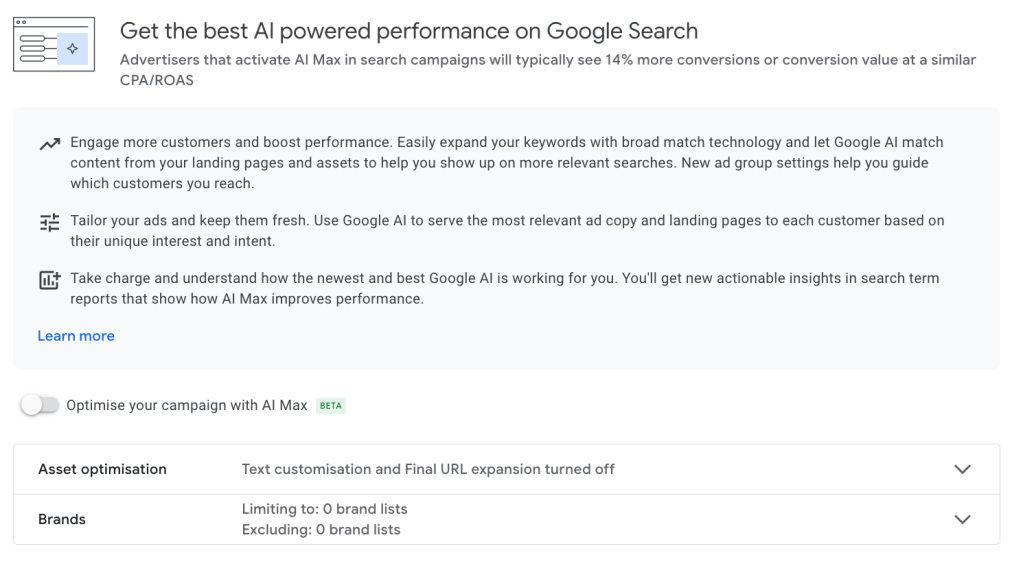
Here’s your damage control strategy:
- Build comprehensive negative keyword lists before enabling AI Max and make sure to include job or student-related terms, competitor names you don’t want to target, and educational queries that don’t convert.
- Use asset removal options to exclude specific headlines, descriptions, or CTAs that don’t align with your messaging strategy.
- Exclude landing pages that don’t match specific campaign goals or audience segments.
If you do test AI Max, start with little budget and monitor search term reports obsessively. The moment you see irrelevant queries eating budget, tighten your negative keyword strategy.
Bidding strategy Google Ads mistakes in B2B
#6: Starving smart bidding with too little or bad quality data
Automated bidding on Google Ads needs consistent, quality conversion signals. B2B SaaS companies often struggle with volume and data quality so the algorithm overbids on junk traffic because it thinks form fills equal success or, even worse, it doesn’t know what to optimize for.
How you can fix this:
- Start with Maximize Conversions while the campaign collects data.
- Switch to Target CPA only after 15+ qualified conversions over 30 days.
- Define higher-quality primary conversions like SQL or won customers and use soft signals like newsletter signups as secondary conversions.
Smart bidding works only when you feed back Google quality data.
#7: Trusting Google’s recommendations
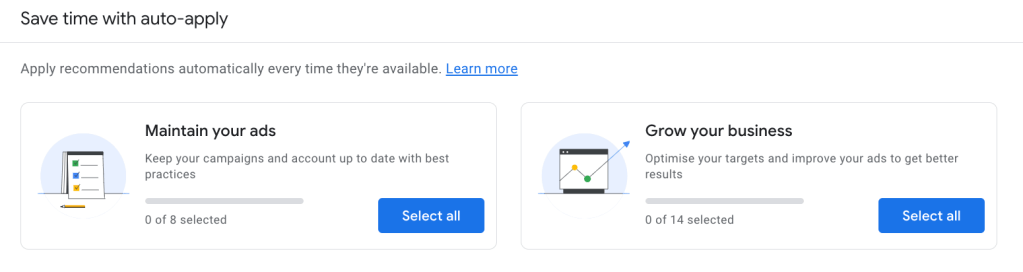
Google’s recommendations prioritize their own revenue, not your performance. Some recommendations might make sense, however others that automatically add broad match keywords, remove “redundant” exact match terms, and expand targeting beyond your carefully defined parameters are those to watch out for.
Review suggestions manually and disable the auto-apply feature. Google often recommends broad match keywords that increase impressions but could trigger ads for irrelevant search terms. Be also careful when Google suggests removing “redundant” keywords. If you remove the keyword from a search campaign, you could end up having PMax campaign steal impressions from your search campaigns.
Creative and landing page Google Ads mistakes
#8: Generic landing pages that kill conversion rates
Sending ad traffic to a landing page or even to a homepage that is not optimized for a specific set of keywords creates friction. This inconsistency between ad messaging and page content can hurt performance and negatively impact your Click-Through-Rate (CTR). Eventually, your Quality Score (QS) will also decrease over time since expected CTR is one of the factors that determines QS.
To fix this:
- Create dedicated landing pages for each campaign.
- Match your ICP explicitly and identify who the page serves so you can speak to their specific challenges.
- Include target keywords naturally throughout the copy in order to maintain consistency from ad to conversion.
Ensure your landing pages are properly optimized for conversions. Since these pages should be noindex, you won’t have to focus on SEO tactics, but it’s still a good practice to add a relevant SEO title, a meta description, and an og:image for better user experience. You should also show specific case studies from similar companies to show some kind of social proof. And your forms? Only request essential form information and leave out information that you can find through research or can enrich with tools like Clay, Lusha or ZoomInfo if you use them. A form with many fields can reduce your conversion rates.
#9: Ad Copy that is not regularly updated
Ad performance often declines over time due to rising competition, shifting market conditions, and ad fatigue from repeated exposure.
Google Ads requires continuous optimization:
- Test new headlines, descriptions, and CTAs bi-monthly or quarterly depending on your traffic.
- Pin specific headlines or descriptions when needed. Although Google recommends against pinning, in B2B cases, it can ensure your ads are shown in more relevant combinations, even if this means losing the ‘Excellent’ ad strength rating. But this will improve your ad CTR, and with time the expected CTR and QS.
- Refresh also landing page copy and don’t forget about other assets like sitelinks and callouts.
Try to consistently improve what you already have and what you see from the data.
Keyword and placement mistakes for B2B Google Ads
#10: Match types that trigger ads for the wrong audience
Broad match keywords in B2B campaigns attract job seekers searching for “marketing manager salary” when you’re targeting “marketing automation software.” Without proper match types and negative keywords, budgets end up generating irrelevant clicks.
Use exact and phrase match for limited budgets and control the search terms report frequently. Broad match works for keyword discovery, ideally when combined with a smart bidding strategy. But more than ever you need to keep an eye on the search queries and consistently add negative keywords even if you use exact and phrase match keywords.
Target high-intent keywords strategically:
- Problem-aware: “merchant center feed disapproved”
- Solution-seeking: “best feed management software for marketing”
- Comparisons: “Productsup vs Channable for feed management”
Review search term reports weekly. Add negatives for “free,” “jobs,” “course,” and competitor names you don’t want to target.
#11: Budget-bleeding placements not being excluded
More often than you might think, a lot of times the display campaign spend goes to kids’ YouTube channels and mobile games. Your B2B SaaS ads appear next to Peppa Pig videos because Google defaults to broad placements that generate clicks but never conversions.
Set account-level placement exclusions before launching any campaigns. Go to Account Settings > Content Suitability and exclude “Content suitable for families.” Download community-curated exclusion lists for YouTube kids channels and upload them easily via Google Ads Editor.
For Display and Demand Gen campaigns, exclude all mobile app categories by selecting “App Categories”. I apply master exclusion lists to every new campaign by default. Start strict, then selectively re-open placements that prove pipeline impact.
The reality check
Google Ads for B2B requires patience, precision, and persistent optimizations. Longer sales cycles and multiple decision-makers mean that you need to make the most out of your data. Tracking, targeting, and creative need to be significantly more sophisticated than consumer campaigns.
Success in B2B marketing comes from focusing on lead quality over quantity, implementing conversion tracking that works and reflects actual business value, and keeping an eye over Google’s automated recommendations without blindly trusting them.
When you avoid these mistakes and implement strategic best practices, Google Ads can become your highest-performing channel for capturing high-intent demand for your B2B SaaS. But it also takes time and a constant testing mindset since every industry is different.
Strategize your B2B Google Ads account with these learnings in mind and you’ll avoid the most expensive mistakes that kill campaigns before they have a chance to work.
What other mistakes come up in your B2B Google Ads audits? Share in the comments or drop me a DM on LinkedIn!
FAQs about Google Ads for B2B
Do Google Ads work for B2B?
Yes, Google Ads consistently outperform other channels for bottom-funnel B2B metrics like SQLs and revenue. The key difference? B2B requires surgical precision in targeting, clean and consistent conversion data from offline conversions, and value-based conversion goals.
What is the difference between B2B and B2C Google Ads?
B2B campaigns target multiple decision-makers with long sales cycles, between 6-18 months. It requires precise keyword and placement targeting. B2C focuses on individual consumers with immediate purchase intent. Instead, B2B needs higher-quality conversion tracking (SQLs vs purchases), industry-specific messaging, and patience for delayed revenue attribution given the long sales cycles.
How to run B2B Google Ads?
Start by setting up your Google Ads account and defining the goals you want to achieve. Then, identify your ICP (Ideal Customer Profile) and create ads and landing pages that speak to your audience’s needs and pain points. Create your campaigns adding the right set keywords, starting with exact and phrase match types. Make sure to organize them in ad groups by theme or problem-solution aware. Once you collect the first data from your campaigns, optimize accordingly, focusing on quality over quantity.
How to target B2B in Google Ads?
To target B2B in Google Ads:
- Focus on niche keywords and competitor targeting
- Use high-intent audience targeting options such as in-market and custom segments
- Tailor your ad copy and landing pages to businesses, and implement negative keywords to filter out prospects
- Create a separate branded campaign
- Leverage retargeting to keep your business top of mind.
What is the average CTR for Google Ads for B2B in 2025?
In 2025, B2B search campaigns average 8.37% CTR, significantly outperforming other campaign types. Display campaigns typically achieve 1.46% CTR, while Performance Max campaigns hit 1.98%. (Source)
What is the best type of ad for B2B?
Search campaigns targeting high-intent keywords remain the most effective for B2B lead generation. Start with exact and phrase match campaigns and use a mix of problem-aware and solution-seeking keywords. If done well, Google Search ads capture active buyer intent better than other kinds of campaigns like Display.
Do Google Ads work for service business?
Yes, service businesses often see great Google Ads performance because they can target specific problems and pain points and geographical areas within a specific radius. Professional services, consulting, and B2B software services particularly benefit from problem-aware campaigns.
What is the 95-5 rule in B2B?
The 95-5 rule in B2B shows that only 5% of your target market is actively buying at any given time. The remaining 95% are out-of-market. Most B2B campaigns should focus on capturing that 5% with high-intent keywords while building strategic demand generation for the other 95%.
Featured image: Stable Diffusion Online



 Stefano Mandola